Social Media Guide
Jan 1, 2026
How to Run an Ad on YouTube
Learn how to run ads on YouTube step by step, including ad types, setup inside Google Ads, budgeting tips, and how to optimize performance.

Jump To
What You Need Before Running YouTube Ads
Before launching ads on YouTube, you need a few basic requirements in place. First, you must have a Google Ads account linked to a YouTube channel. This allows you to create video campaigns and track performance metrics.
You’ll also need a video that follows YouTube’s advertising policies. Ads that contain misleading claims, copyrighted material, or restricted content will be rejected. Preparing a clear call to action and knowing your target audience ahead of time will make setup much easier.
Types of YouTube Ads You Can Run
YouTube offers several ad formats depending on your goals:
Skippable in-stream ads appear before or during videos and allow viewers to skip after five seconds.
Non-skippable in-stream ads must be watched before the video plays and are limited to short durations.
In-feed video ads appear in search results and on the YouTube homepage.
Bumper ads are six-second, non-skippable ads designed for quick brand awareness.
Each format serves a different purpose, so choosing the right one depends on whether you want views, traffic, or conversions.
How to Set Up a YouTube Ad Campaign
To launch a campaign:
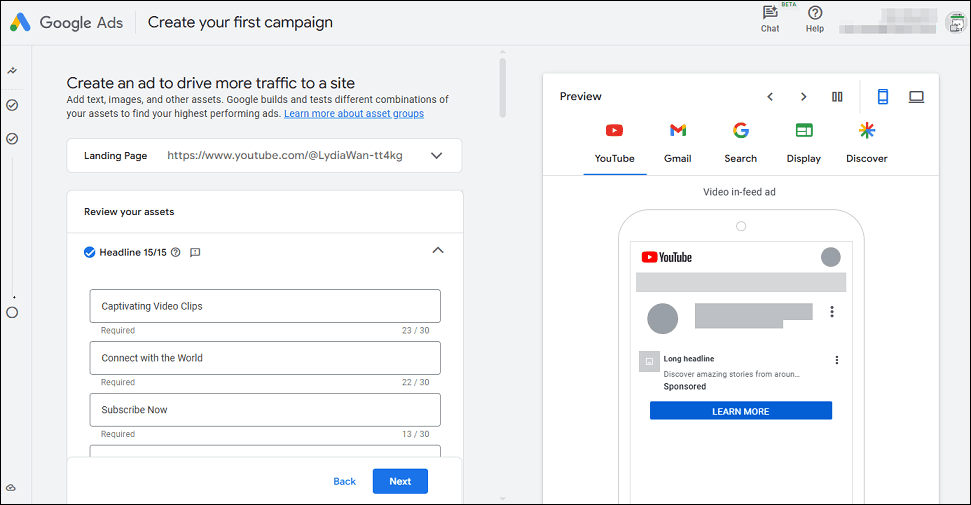
Sign in to Google Ads
Select “Create a campaign"
Choose your advertising goal
Select “Video” as your campaign type and upload your ad or choose an existing YouTube video.
You’ll then define your target audience based on location, interests, demographics, or keywords. Setting a daily budget and bid strategy determines how often your ad is shown and how much you spend.
Google provides step-by-step guidance here.
How Much YouTube Ads Cost
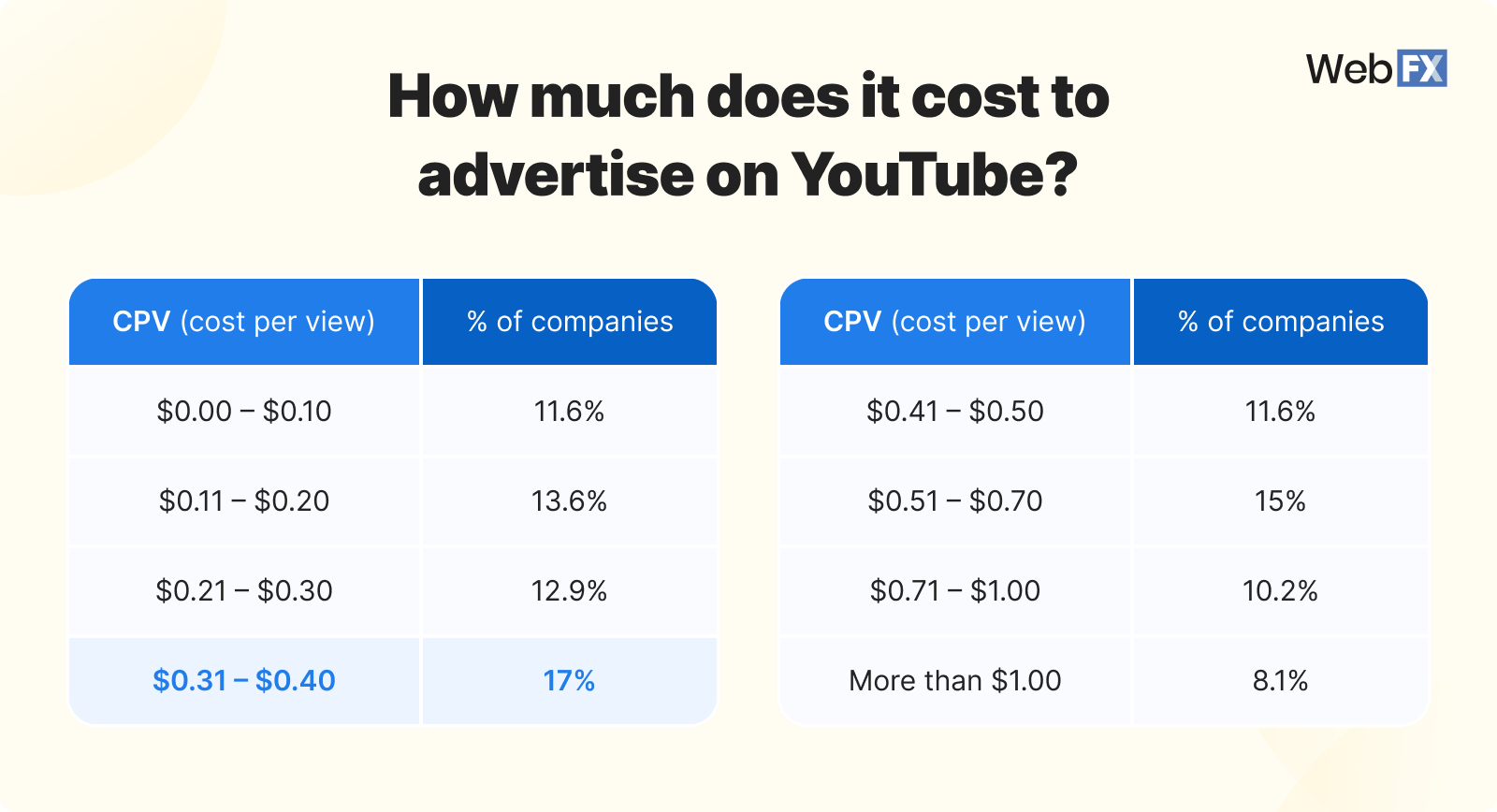
YouTube advertising costs vary depending on competition, targeting, and ad quality. Most advertisers pay between $0.05 and $0.30 per view, though prices can be higher in competitive niches.
You only pay when someone watches at least 30 seconds of your ad or interacts with it. This makes YouTube ads one of the more cost-effective ways to reach large audiences.
Tips to Improve YouTube Ad Performance
The first five seconds of your ad matter most. Capture attention immediately with a strong visual or statement. Avoid slow intros or overly branded openings.
Target your ads carefully by interests, keywords, or specific channels. Testing multiple versions of your ad can also reveal what messaging performs best.
Shorter, direct videos tend to perform better, especially on mobile devices.
Common Mistakes to Avoid
Many advertisers make the mistake of targeting too broadly, which wastes budget on uninterested viewers. Others fail to track conversions or optimize campaigns over time.
Avoid reusing organic content that isn’t designed for ads. Successful YouTube ads are built with clear messaging, strong hooks, and a specific goal in mind.
FAQ
How much does it cost to run ads on YouTube?
Costs typically range from $0.05 to $0.30 per view, depending on targeting and competition.
Do I need a YouTube channel to run ads?
Yes. You must link a YouTube channel to your Google Ads account.
Can I run ads without showing my face?
Yes. Many advertisers use screen recordings, animations, or text-based videos.
How long does it take for ads to start running?
Most ads begin delivering within a few hours after approval.