Social Media Guide
Jan 7, 2026
How to Stream Netflix on Discord
Learn how to stream Netflix on Discord step by step, why the black screen issue happens, and what settings actually fix it so others can watch your screen.
Jump To
Can You Stream Netflix on Discord?
Yes, you can stream Netflix on Discord by screen sharing your browser or desktop in a voice channel. Discord’s Go Live feature allows you to share your screen with friends or server members in real time.
However, many users run into issues where the video appears as a black screen for viewers. This is not a Discord bug, but rather a result of how Netflix protects its content.
Why Netflix Shows a Black Screen on Discord
Netflix uses DRM (Digital Rights Management) technology to prevent unauthorized recording or redistribution of its content. When Netflix detects screen capture or hardware acceleration, it may block the video output.
This causes viewers on Discord to see a black screen while audio may still play. The issue typically occurs when hardware acceleration is enabled in the browser or Discord.
Netflix explains content protection in more detail here:
https://help.netflix.com/en/node/100628
How to Stream Netflix on Discord Without a Black Screen
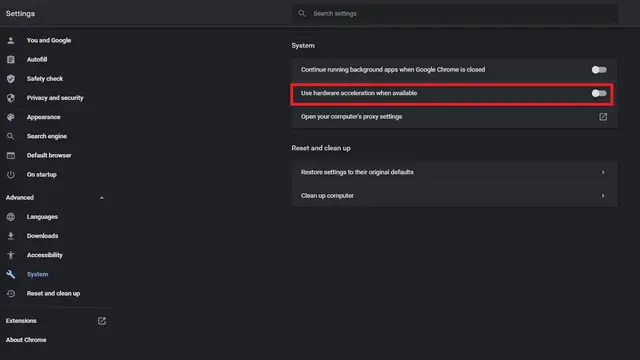
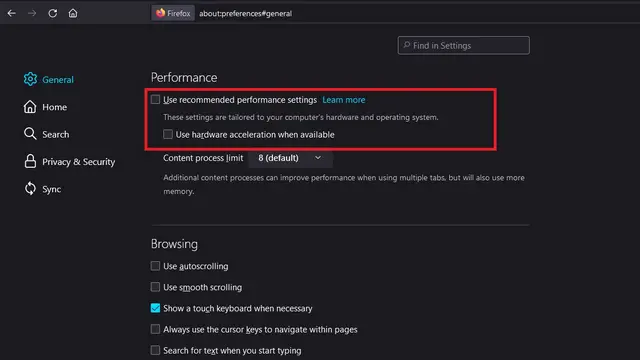
The most reliable fix is disabling hardware acceleration in your browser.
Follow these steps:
Open your browser settings
Find Advanced or System settings
Turn off Hardware Acceleration
Restart the browser
Start screen sharing the browser window on Discord
Once hardware acceleration is disabled, Netflix usually displays correctly for viewers.
Chrome:
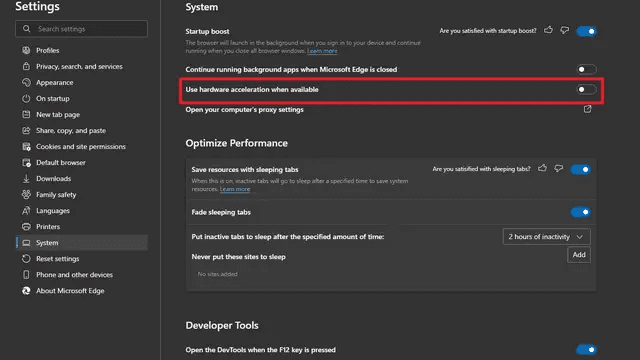
Edge:
Firefox:
Best Browser and Discord Settings to Use
Most users have the best results using Google Chrome or Microsoft Edge with hardware acceleration turned off.
In Discord:
Disable hardware acceleration in Discord settings
Stream the specific browser tab instead of the entire screen
Set stream quality to match your internet speed
Discord’s screen sharing guide explains supported configurations:
https://support.discord.com/hc/en-us/articles/360040816151
Common Problems and Fixes
If the black screen persists, try:
Updating Discord and your browser
Switching browsers
Restarting Discord completely
Streaming the entire screen instead of the tab
Disabling VPNs or overlays
In some cases, using an older browser version or switching to window capture can temporarily resolve the issue.
Is Streaming Netflix on Discord Allowed?
Streaming Netflix on Discord for personal viewing with friends exists in a legal gray area. Netflix’s terms generally prohibit public rebroadcasting of content.
Private streams among friends are common, but streaming to large public servers or monetized communities may violate Netflix’s terms of service. For clarity, always review Netflix’s usage policies:
https://help.netflix.com/legal/termsofuse
FAQ
Why does Netflix show a black screen on Discord?
Because Netflix uses DRM to block screen capture when hardware acceleration is enabled.
Does disabling hardware acceleration affect performance?
Slightly, but most modern systems handle Netflix playback without issues.
Can I stream Netflix audio only?
Yes, audio may still work even when video is blocked.
Does this work on mobile Discord?
No. Netflix streaming fixes mainly apply to desktop Discord.